MICROSOFT 365 WORKPLACE MANAGEMENT

Microsoft 365 for Desk Booking and Workplace Management

DeskFlex connects with Microsoft 365 to bring Microsoft authentication, Outlook calendar sync, and Teams availability together through a single Microsoft deployment.

Stop stitching workplace systems together

Scheduling becomes harder when employee authentication, calendars, and coordination rely on separate systems.


Without a connected Microsoft setup, IT ends up managing access in multiple places while employees bounce between tools that don’t share information.
One Microsoft setup. Multiple workplace integrations.

Connect

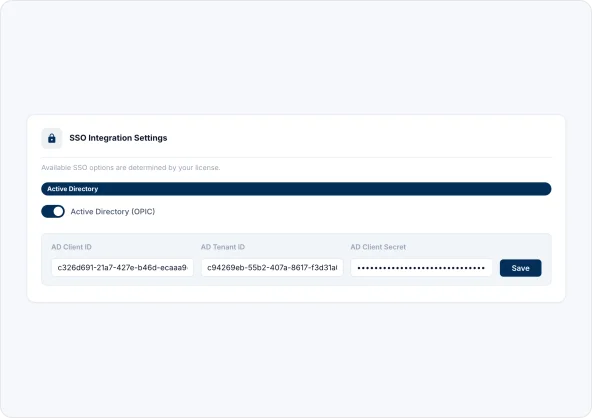
Register DeskFlex as an application in Microsoft Azure and obtain a Client ID, Tenant ID, and Client Secret.

Configure

Enable Active Directory in DeskFlex Settings → Login & SSO and complete the Grant Admin Consent process to approve Microsoft permissions.

Use

Employees can sign in using Microsoft credentials, Outlook calendars automatically sync, and Microsoft Teams availability becomes visible in DeskFlex.

One Microsoft setup. Less workplace chaos.

Let employees sign in with Microsoft

Employees can access DeskFlex using their Microsoft work account, reducing account management and simplifying access from day one.

Microsoft Entra ID

Keep calendars synchronized automatically

Desk reservations and room bookings automatically sync to Outlook calendars, helping employees stay aligned.

Room Scheduling

See who’s in before you book

Microsoft Teams availability appears directly in DeskFlex, so employees know who’s coming in before they commit to a desk.

Desk Booking

Built for teams behind workplace tech

Microsoft Outlook integration

Automatically sync desk reservations and room bookings with Outlook calendars.

View Integration

Microsoft Teams integration

Display Microsoft Teams availability directly inside DeskFlex during scheduling.

View Integration

See how DeskFlex works with Microsoft 365

Explore how Microsoft authentication, Outlook calendar sync, and Teams availability work together to support workplace operations from one connected platform.

Scroll to Top